AI教我学UE之python自动化创建Actor
你要达到的目标
- Cesium 地形当“地面”
- GeoJSON 田块边界变成 UE 的 样条 (Spline),用来限定生成范围
- PCG在田块里按固定间距撒点
- 用 射线投射 (Raycast) 往下打到 Cesium 碰撞,实现贴地
第 0 步:必须先把 Cesium 碰撞打开(否则贴地失败)
- 在 世界大纲 (World Outliner) 选中你的地形 Tileset(通常叫
CesiumWorldTerrain对应的 Cesium3DTileset) - 右侧 细节 (Details) 搜索:
碰撞/Collision - 设置:
- 启用碰撞 (Enable Collision):✅勾选
- 如果有 碰撞预设 (Collision Presets):选 阻挡全部 (BlockAll)
- 或至少保证 可见性 (Visibility) 会被阻挡(因为 PCG Raycast 通常用 Visibility 通道)
第 1 步:启用 Python
- 顶部菜单:编辑 (Edit) → 插件 (Plugins)
- 搜索:
Python - 勾选:Python 编辑器脚本插件 (Python Editor Script Plugin)
- 右下角:重启 (Restart Now)
第 2 步:把 GeoJSON 放到项目 Content 目录(固定路径,脚本不用改)
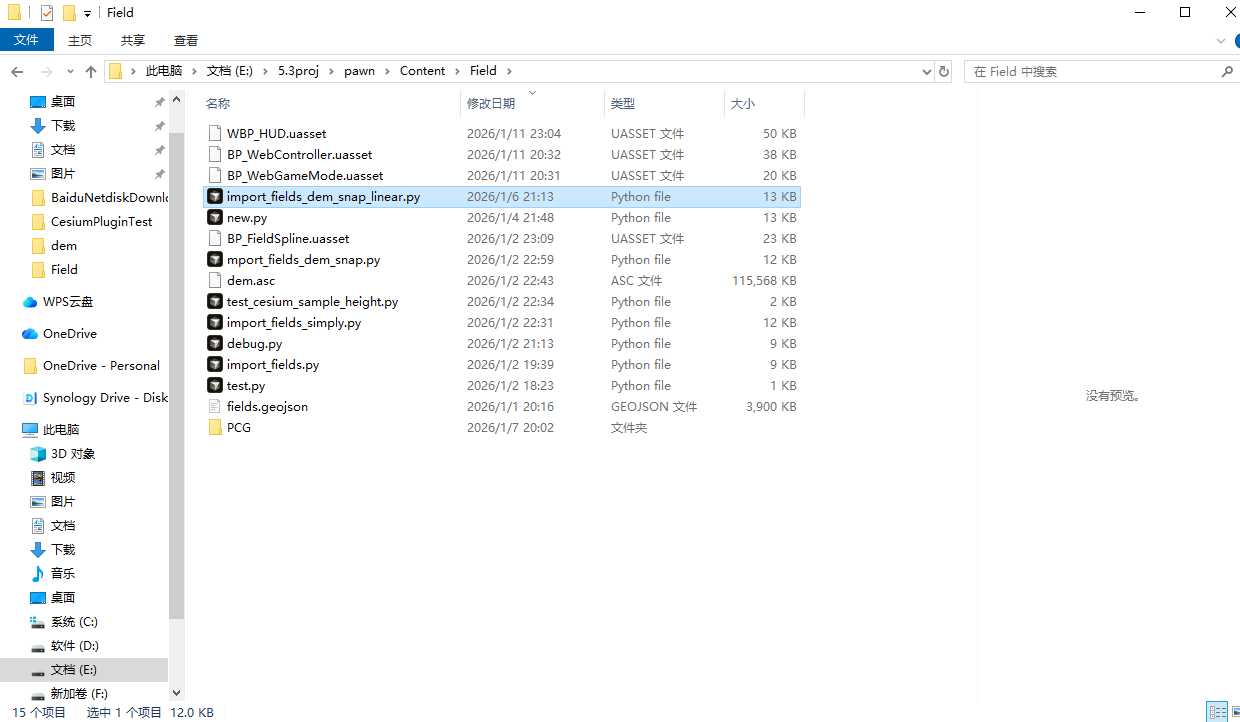
把你的 geojson 文件保存成:fields.geojson
放到磁盘路径:
你的项目/Content/Field/fields.geojson
如果没有 Field 文件夹:
- 内容浏览器中在 Content 上右键 → 新建文件夹 (New Folder) → 命名
Field
第 3 步:一键把 GeoJSON 导入成一批“田块样条 Actor”
3.1 创建脚本文件
- 内容浏览器进入
Content/Field - 空白处右键 → 创建 (Create) → 找 Python 脚本 (Python Script)(或 Script / Python)
- 命名:
import_fields
3.2 粘贴脚本(支持你这种 MultiPolygon FeatureCollection)
双击打开 import_fields.py,全选替换成下面内容:
重要:为了防止你一次性导入全县卡死,这脚本默认只导入“离 CesiumGeoreference 原点一定范围内的田块”。你先跑通小范围,确认流程没问题,再把半径调大。
# -*- coding: utf-8 -*-
import json
import math
import time
import unreal

# ===================== 你只需要改这些参数 =====================

GEOJSON_REL_PATH = "Field/fields.geojson"
# GeoJSON 放到:Content/Field/fields.geojson

DEM_ASC_REL_PATH = "Field/dem.asc"
# 你在 QGIS 导出的 Arc/Info ASCII Grid(.asc),放到:Content/Field/dem.asc

BP_ASSET_PATH = "/Game/Field/BP_FieldSpline"
# 你手动创建的蓝图 Actor(里面带一个 SplineComponent)

IMPORT_RADIUS_M = 20000.0
# 导入半径(米):以 CesiumGeoreference 的位置为中心,超出半径的田块跳过

MAX_FEATURES = 0
# 最多导入多少个田块(0=不限制,不建议初学者直接 0)

RING_POINT_STEP = 1
# 点抽稀:1=不抽稀(最精细);2=每2个点取1个;越大越粗但更快

MAX_RING_POINTS = 20000
# 单个田块边界点数超过就跳过,防止某个大田块卡死

HEIGHT_OFFSET_M = -50.0
# ✅ 高度整体偏移(米):你说“高几米”,先用 -5
# 如果仍偏高:-6、-8;如果偏低:-3、-2;调到贴地为止

ACTOR_PREFIX = "Field_"
ACTOR_FOLDER = "Fields"
TAG_NAME = "FIELD"

FALLBACK_HEIGHT_M = 0.0
# DEM 采样不到高度时的兜底高度(米)

PROGRESS_EVERY_POINTS = 500
# 每处理多少个点打印一次进度日志(数值小=日志多)

# ============================================================


def get_abs_content_path(rel_path):
    content_dir = unreal.Paths.project_content_dir()
    return unreal.Paths.convert_relative_path_to_full(
        unreal.Paths.combine([content_dir, rel_path])
    )


def get_all_level_actors():
    # 优先新接口,失败则回退旧接口
    try:
        eas = unreal.get_editor_subsystem(unreal.EditorActorSubsystem)
        if hasattr(eas, "get_all_level_actors"):
            return eas.get_all_level_actors()
    except Exception:
        pass
    return unreal.EditorLevelLibrary.get_all_level_actors()


def find_cesium_georeference():
    for a in get_all_level_actors():
        if "CesiumGeoreference" in a.get_class().get_name():
            return a
    return None


def distance_xy_m(a: unreal.Vector, b: unreal.Vector):
    # UE 单位 cm -> m
    dx = (a.x - b.x) / 100.0
    dy = (a.y - b.y) / 100.0
    return math.sqrt(dx * dx + dy * dy)


def ring_from_geometry(geom):
    gtype = geom.get("type", "")
    coords = geom.get("coordinates", None)
    if not coords:
        return None

    if gtype == "MultiPolygon":
        ring = coords[0][0]  # 第0个 polygon 的外环
    elif gtype == "Polygon":
        ring = coords[0]     # 外环
    else:
        return None

    # 去掉最后一个重复点(GeoJSON 常见)
    if len(ring) >= 2 and ring[0][0] == ring[-1][0] and ring[0][1] == ring[-1][1]:
        ring = ring[:-1]

    return ring


def load_bp_class():
    bp = unreal.load_asset(BP_ASSET_PATH)
    if not bp:
        raise RuntimeError(f"找不到蓝图资产:{BP_ASSET_PATH}\n请确认路径正确并已保存/编译。")

    name = BP_ASSET_PATH.split("/")[-1]
    gen_class_path = f"{BP_ASSET_PATH}.{name}_C"  # /Game/Field/BP_FieldSpline.BP_FieldSpline_C
    cls = unreal.load_class(None, gen_class_path)
    if not cls:
        raise RuntimeError("load_class 失败:请打开蓝图 Compile(编译)+ Save(保存)后再试。")
    return cls


def spawn_field_actor(bp_class, label: str):
    actor = unreal.EditorLevelLibrary.spawn_actor_from_class(bp_class, unreal.Vector(0, 0, 0))
    actor.set_actor_label(label)

    try:
        actor.set_folder_path(ACTOR_FOLDER)
    except Exception:
        pass

    actor.tags = list(actor.tags) + [unreal.Name(TAG_NAME)]

    comps = actor.get_components_by_class(unreal.SplineComponent)
    if not comps:
        raise RuntimeError("生成的 BP actor 上找不到 SplineComponent。请确认蓝图里确实添加了 Spline 组件。")
    return actor, comps[0]


class AsciiDEM:
    """
    Arc/Info ASCII Grid (.asc) 强健读取版
    - 自动补齐缺行/缺列
    header:
      ncols
      nrows
      xllcorner / xllcenter
      yllcorner / yllcenter
      cellsize
      NODATA_value
    data: 从上到下每行
    """
    def __init__(self, path):
        with open(path, "r", encoding="utf-8", errors="ignore") as f:
            header = {}
            while len(header) < 6:
                line = f.readline()
                if not line:
                    break
                line = line.strip()
                if not line:
                    continue
                parts = line.split()
                if len(parts) >= 2:
                    header[parts[0].lower()] = float(parts[1])

            self.ncols = int(header.get("ncols", 0))
            self.nrows = int(header.get("nrows", 0))
            self.xll = header.get("xllcorner", header.get("xllcenter", 0.0))
            self.yll = header.get("yllcorner", header.get("yllcenter", 0.0))
            self.cell = header.get("cellsize", 0.0)
            self.nodata = header.get("nodata_value", -9999.0)

            if self.ncols <= 0 or self.nrows <= 0 or self.cell <= 0:
                raise RuntimeError("DEM asc header 解析失败,请确认是 Arc/Info ASCII Grid 格式。")

            data = []
            for _ in range(self.nrows):
                line = f.readline()
                if not line:
                    break

                vals = line.strip().split()
                if not vals:
                    data.append([self.nodata] * self.ncols)
                    continue

                row = [float(v) for v in vals]

                # 行不够 ncols,则继续读后面行拼起来(容错折行)
                while len(row) < self.ncols:
                    extra = f.readline()
                    if not extra:
                        break
                    extra_vals = extra.strip().split()
                    if not extra_vals:
                        break
                    row += [float(v) for v in extra_vals]

                # 不够补 NODATA
                if len(row) < self.ncols:
                    row += [self.nodata] * (self.ncols - len(row))

                # 多了截断
                row = row[:self.ncols]
                data.append(row)

            if len(data) < self.nrows:
                missing = self.nrows - len(data)
                unreal.log_warning(f"DEM 行数不足:期望 {self.nrows} 行,实际 {len(data)} 行,自动补齐 {missing} 行 NODATA。")
                for _ in range(missing):
                    data.append([self.nodata] * self.ncols)

            if len(data) > self.nrows:
                data = data[:self.nrows]

            self.data = data

            # 认为 DEM 是经纬度(EPSG:4326):
            self.minx = self.xll
            self.miny = self.yll
            self.maxx = self.xll + self.cell * self.ncols
            self.maxy = self.yll + self.cell * self.nrows

    def sample(self, lon, lat):
        # 超出范围
        if lon < self.minx or lon > self.maxx or lat < self.miny or lat > self.maxy:
            return None

        col = int((lon - self.xll) / self.cell)
        row_from_bottom = int((lat - self.yll) / self.cell)
        row = self.nrows - 1 - row_from_bottom  # asc 从上到下

        if col < 0 or col >= self.ncols or row < 0 or row >= self.nrows:
            return None

        h = self.data[row][col]
        if abs(h - self.nodata) < 1e-6:
            return None
        return h


def run():
    t0 = time.time()

    geojson_path = get_abs_content_path(GEOJSON_REL_PATH)
    dem_path = get_abs_content_path(DEM_ASC_REL_PATH)

    if not unreal.Paths.file_exists(geojson_path):
        raise RuntimeError(f"找不到 GeoJSON:{geojson_path}\n请确认放在 Content/{GEOJSON_REL_PATH}")

    if not unreal.Paths.file_exists(dem_path):
        raise RuntimeError(f"找不到 DEM asc:{dem_path}\n请确认放在 Content/{DEM_ASC_REL_PATH}")

    georef = find_cesium_georeference()
    if not georef:
        raise RuntimeError("场景里没找到 CesiumGeoreference。请先把 CesiumGeoreference 拖到关卡里。")

    bp_class = load_bp_class()
    unreal.log(f"BP_CLASS = {bp_class}")

    unreal.log("读取 DEM asc ...")
    dem = AsciiDEM(dem_path)
    unreal.log(f"DEM 范围:lon[{dem.minx},{dem.maxx}] lat[{dem.miny},{dem.maxy}] cell={dem.cell}")

    with open(geojson_path, "r", encoding="utf-8") as f:
        data = json.load(f)

    feats = data.get("features", [])
    if not feats:
        raise RuntimeError("GeoJSON 没有 features。")

    origin = georef.get_actor_location()
    total = len(feats) if MAX_FEATURES == 0 else min(len(feats), MAX_FEATURES)

    imported = 0
    skipped_far = 0
    skipped_big = 0
    skipped_bad = 0
    used_fallback = 0
    total_points = 0

    step = max(1, int(RING_POINT_STEP))

    with unreal.ScopedSlowTask(total, "Import fields (snap to DEM + linear corners)...") as slow:
        slow.make_dialog(True)

        for idx, feat in enumerate(feats):
            if MAX_FEATURES != 0 and idx >= MAX_FEATURES:
                break
            if slow.should_cancel():
                unreal.log_warning("用户取消导入。")
                break

            slow.enter_progress_frame(1, f"Feature {idx+1}/{total} | imported {imported}")

            geom = feat.get("geometry", None)
            if not geom:
                skipped_bad += 1
                continue

            ring = ring_from_geometry(geom)
            if not ring or len(ring) < 3:
                skipped_bad += 1
                continue

            if len(ring) > MAX_RING_POINTS:
                skipped_big += 1
                continue

            # 半径过滤:用第一个点的 dem 高度估一个 UE 坐标
            lon0, lat0 = float(ring[0][0]), float(ring[0][1])
            h0 = dem.sample(lon0, lat0)
            if h0 is None:
                h0 = FALLBACK_HEIGHT_M
            h0 = h0 + HEIGHT_OFFSET_M

            # inaccurate 更快够用来过滤距离
            p0 = georef.inaccurate_transform_longitude_latitude_height_to_unreal(unreal.Vector(lon0, lat0, h0))
            if distance_xy_m(p0, origin) > IMPORT_RADIUS_M:
                skipped_far += 1
                continue

            actor, spline = spawn_field_actor(bp_class, f"{ACTOR_PREFIX}{idx:06d}")
            spline.clear_spline_points(True)

            ring2 = ring[::step]
            if len(ring2) < 3:
                skipped_bad += 1
                continue

            # ---- 加点:使用 DEM 高度 + 偏移 ----
            for p in ring2:
                lon, lat = float(p[0]), float(p[1])
                h = dem.sample(lon, lat)
                if h is None:
                    h = FALLBACK_HEIGHT_M
                    used_fallback += 1

                h = h + HEIGHT_OFFSET_M  # ✅ 关键:整体下压几米

                # lon/lat/height -> Unreal
                u = georef.transform_longitude_latitude_height_to_unreal(unreal.Vector(lon, lat, h))
                spline.add_spline_point(u, unreal.SplineCoordinateSpace.WORLD, False)

                total_points += 1
                if total_points % PROGRESS_EVERY_POINTS == 0:
                    unreal.log(f"点数 {total_points} | fallback {used_fallback}")

            # ---- ✅ 关键:把点类型改为线性,拐角不再圆润 ----
            num_pts = spline.get_number_of_spline_points()
            for i in range(num_pts):
                spline.set_spline_point_type(i, unreal.SplinePointType.LINEAR, False)

            spline.set_closed_loop(True, False)
            spline.set_editor_property("bSplineHasBeenEdited", True)
            spline.update_spline()

            imported += 1

    unreal.log(f"✅ 完成:导入 {imported} 个 | 跳过远 {skipped_far} | 跳过超大 {skipped_big} | 坏数据 {skipped_bad}")
    unreal.log(f"总点数 {total_points} | 使用fallback高度 {used_fallback}")
    unreal.log("总耗时:%.2fs" % (time.time() - t0))


run()
3.3 运行脚本
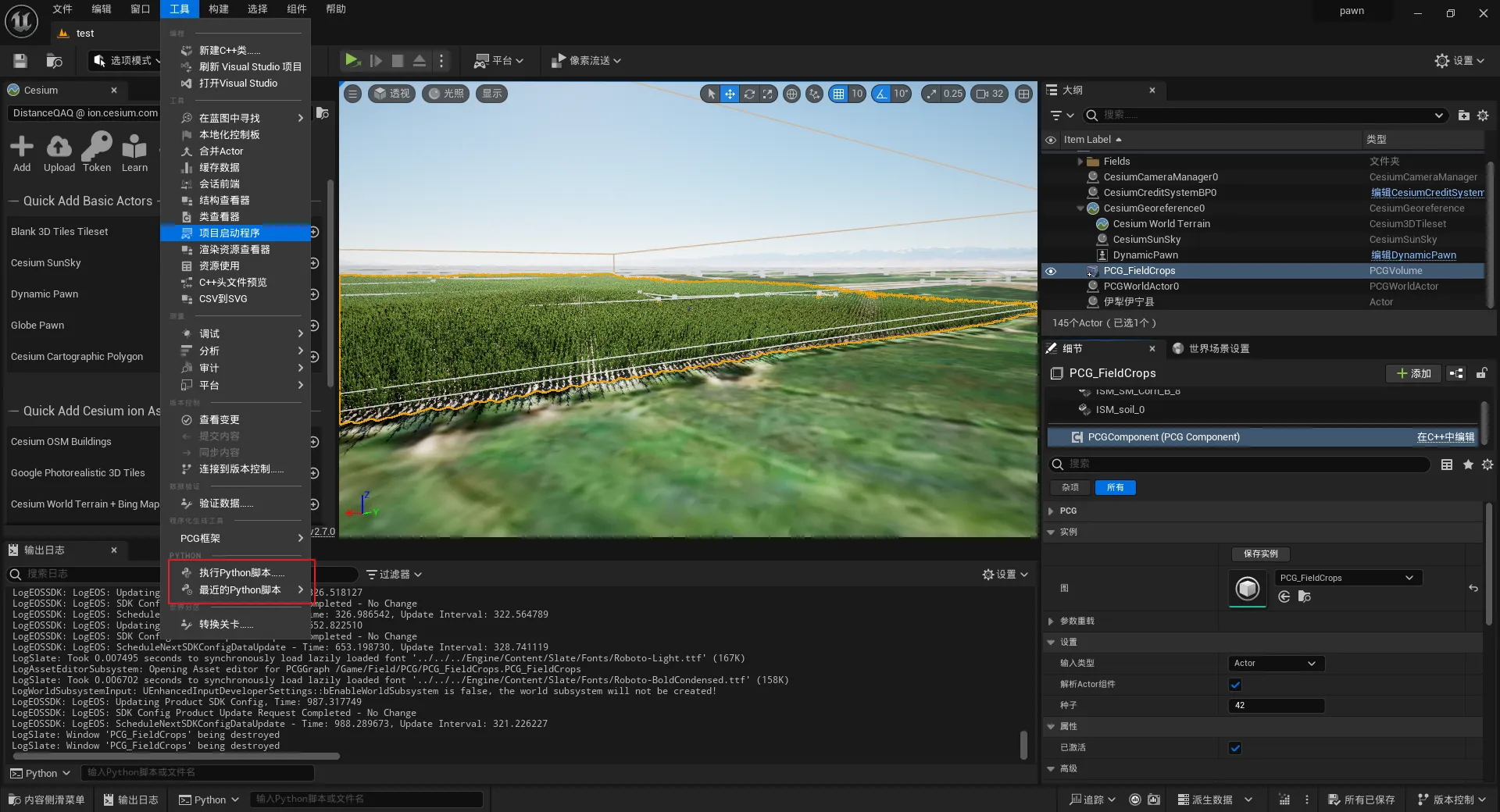
- 顶部菜单:窗口 (Window) → 开发者工具 (Developer Tools) → Python (Python)
- 在 Python 面板里点:运行脚本 (Run Script)
- 选择:
Content/Field/import_fields.py
运行后你会在 Outliner 里看到很多 Field_000xxx Actor,每个都是一个闭合样条田块,并且都带了 Tag:FIELD。
第 4 步:创建 PCG 图表
4.1 新建 PCG Graph
- 内容浏览器(Content Browser) 右键空白处
- 创建高级资产(Create Advanced Asset) → 程序化内容生成(PCG) → PCG 图表(PCG Graph)
- 命名:
PCG_Plants - 双击打开
4.2 在 PCG Graph 里放节点
节点 1:获取田块 Actor(按 Tag)
- 空白处右键 → 搜索:
Get Actor Data - 添加:获取演员数据(Get Actor Data)
- 选中节点 → 右侧 细节(Details):
- Filter by Tag(按标签过滤):填
FIELD - Actor Selection / Selection:选 “All Actors in World(世界中所有 Actor)” 或默认即可
- Filter by Tag(按标签过滤):填
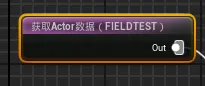
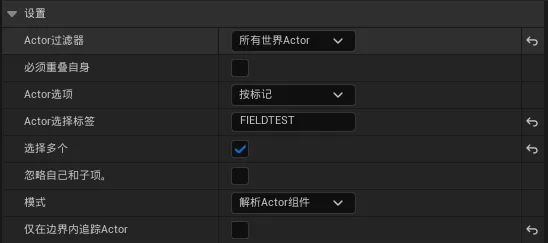
这一步:把你脚本导入的田块样条 Actor 全部拿进来。
节点 3:在“样条内部”按等间距生成点
- 右键搜索:
Spline Sampler - 添加:样条采样器(Spline Sampler)
- 连接:
Get Spline Data→Spline Sampler
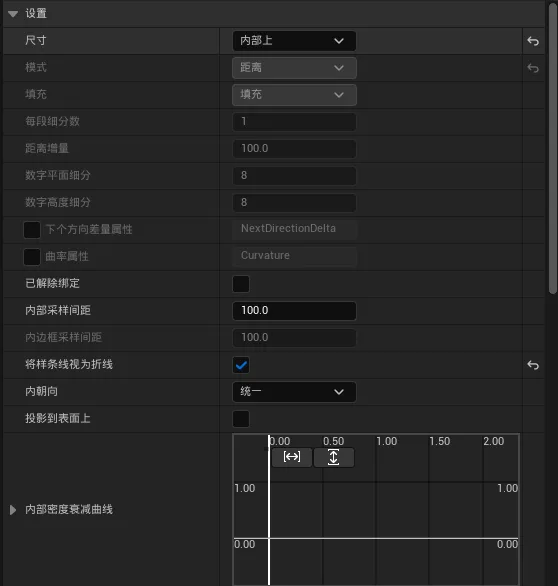
这一步就完成了:田块样条内部“等间距出点”。
节点 4:贴地用 “World Ray Hit Query + Projection”
4.1 放“世界射线命中查询(World Ray Hit Query)”
- 右键搜索:
World Ray Hit Query - 添加:世界射线命中查询(World Ray Hit Query)
选中它 → Details 设置:
- Direction(方向):
(0, 0, -1)(向下) - Distance(距离):
2000000(= 20km,单位 cm)
4.2 放“投影(Projection)”
- 右键搜索:
Projection - 添加:投影(Projection)
连线方式(很重要):
Spline Sampler输出 → 接到Projection的 Source(源)World Ray Hit Query输出 → 接到Projection的 Target(目标)
这一步:把内部等距点沿 Z 向下投影到你地表/碰撞网格上,完成贴地。
节点 5:生成植物 Mesh(必须 HISM)
- 右键搜索:
Static Mesh Spawner - 添加:静态网格生成器(Static Mesh Spawner)
- 连接:
Projection→Static Mesh Spawner
选中 Spawner → Details 设置:
- Mesh(网格体):选你的玉米 Mesh
- Instancing / Instance Type(实例化):选 HISM(Hierarchical Instanced Static Mesh)
最后 保存(Save) PCG_Plants
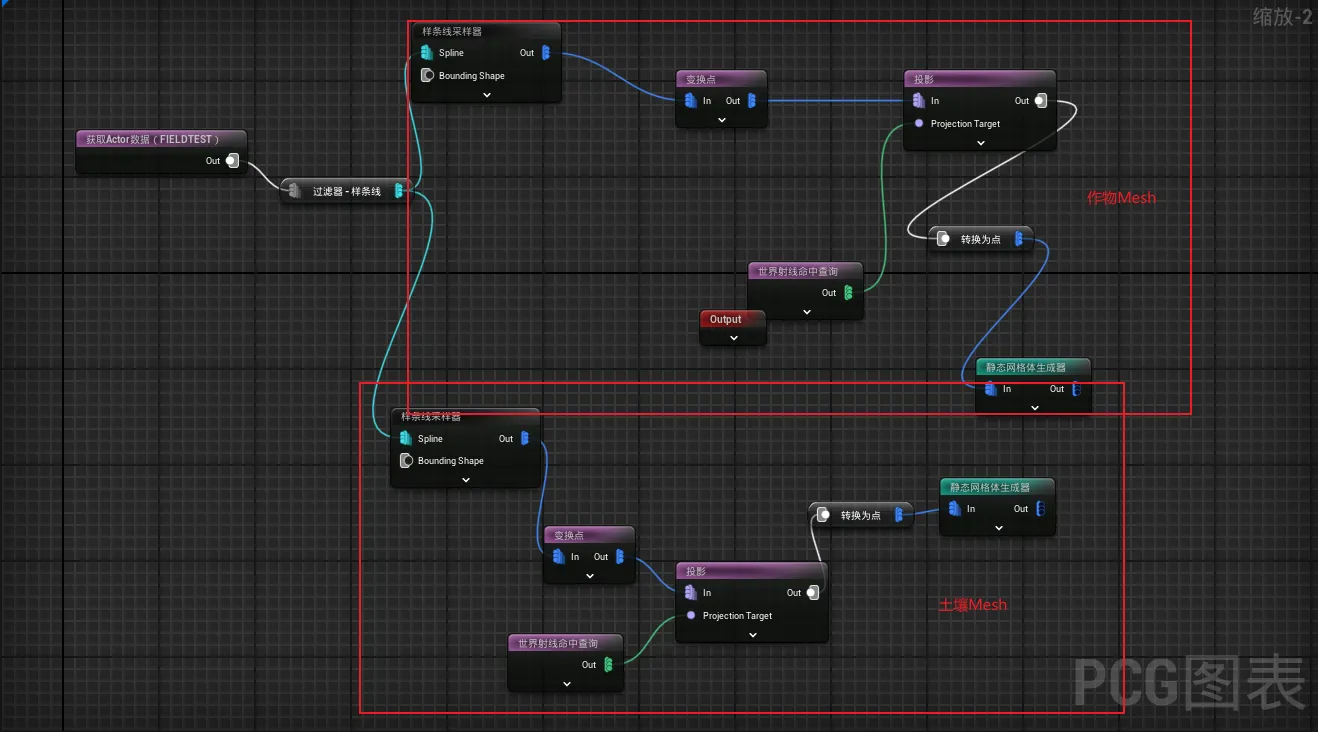
第 5 步:放 PCG Volume 并生成(按按钮)
5.1 放 PCG Volume(测试用,小范围)
- 打开 放置演员(Place Actors)
- 搜索:
PCG Volume - 拖一个 PCG 体积(PCG Volume) 到场景
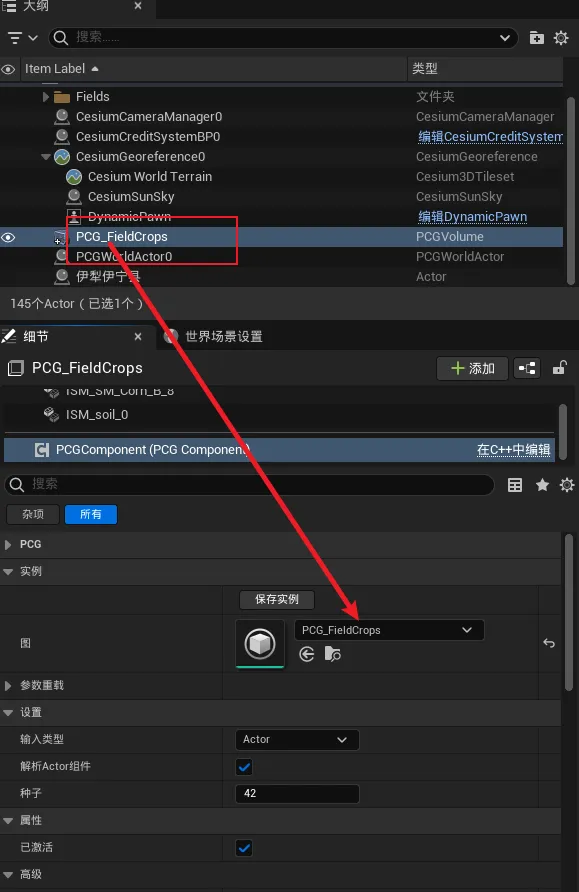
- 选中 PCG Volume → 右侧 细节(Details)→ PCG → Graph(图表) 选
PCG_Plants - 把 PCG Volume 缩小到测试区域(比如你相机附近 1~2km 的范围)
- 在 Details 里点 生成(Generate)
第 6 步:性能优化设置
目标:只渲染相机附近,提升帧数。
6.1 在 PCG Graph 的 Static Mesh Spawner 上设置裁剪距离
选中 Static Mesh Spawner 节点,在 Details 里找(不同项目显示略不同,但英文关键词一致):
- Start Cull Distance(起始裁剪距离):
150000(= 1500m) - End Cull Distance(结束裁剪距离):
250000(= 2500m)
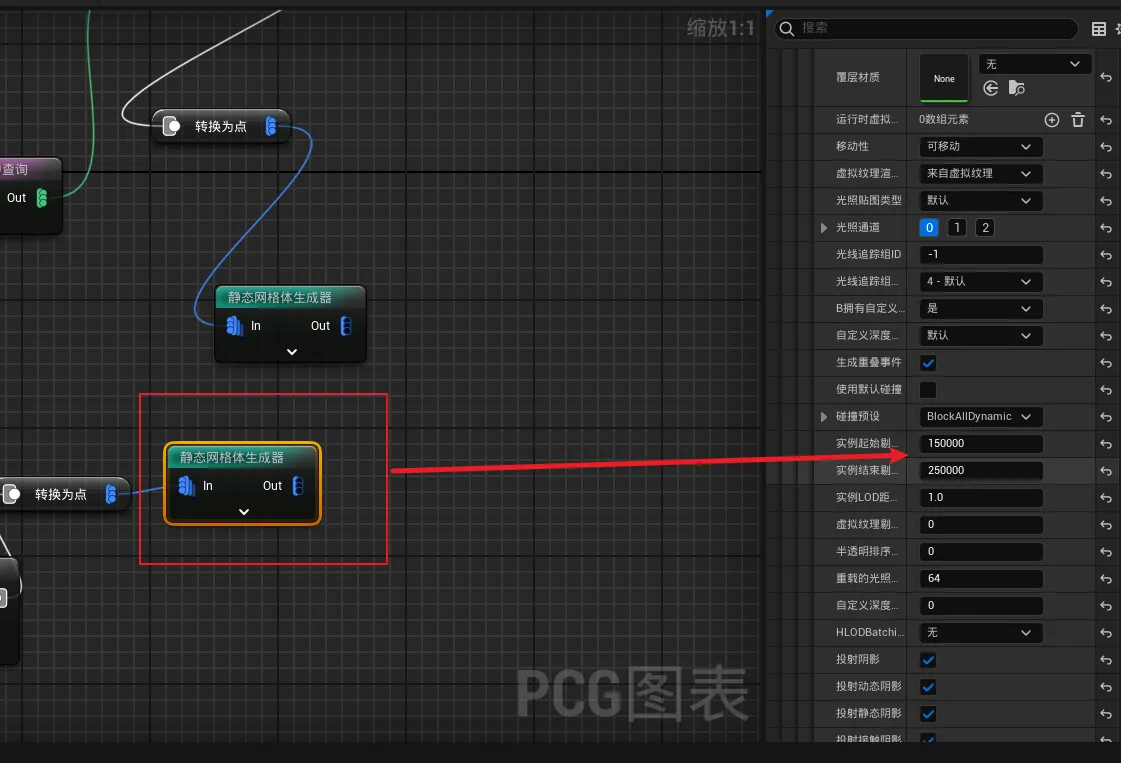
第 5 步:放 PCG Volume
- 打开 放置演员 (Place Actors)
- 搜索:PCG 体积 (PCG Volume)
- 拖到场景里
- 选中 PCG Volume → 右侧细节:
- PCG 组件 (PCG Component) → Graph(图表) 选
PCG_Plants
- PCG 组件 (PCG Component) → Graph(图表) 选
- 把 PCG Volume 调到只覆盖你当前视角附近
- 点按钮:生成 (Generate)